QLE Proby Coinbosa Academy

Indicator for MetaTrader 5

See where to enter, when to wait and where to exit.

QLE Pro plots liquidity, volume profile, institutional zones, volatility and news on your MT5 charts, then calculates your lot size. It suggests, you decide: it places no orders.

  • Key delivered as soon as you pay
  • Card or USDT / USDC
  • One-click installation
Gold chart on M15 in MetaTrader 5 with QLE Pro’s zones and volume profile
XAUUSD M15 in MetaTrader 5: institutional zones, liquidity pockets, estimated liquidations and volume profile.

Three questions, one answer on the chart

Enter

Where to enter

Institutional buy and sell zones (H1 and H4 order blocks aligned with the previous day’s highs and lows), the OTE retracement zone and the screening zone where the next move is expected. Each plan shows the entry, the stop and the targets.

Wait

When not to enter

The PAUSE status appears when high-impact news is approaching, the spread widens, the session is quiet or volatility turns extreme. The risk score out of 100 explains why.

Exit

Where to exit

TP1 and TP2 expressed as multiples of your risk, opposite liquidity pockets (BSL / SSL) as targets, profit and risk zones, and an exit after a set number of candles if the market doesn’t move.

QLE Pro suggests; you decide and place your orders yourself. It has no automated trading function.

What QLE Pro shows on your chart

Layers you switch on with one click at the bottom of the chart.

Volume profile and VWAP

POC, value area (VAH and VAL), previous days’ POCs not yet revisited and the daily VWAP. Volume sub-window with relative volume.

Liquidity and liquidations

BSL and SSL pockets at equal highs and lows and at the previous day’s extremes. Map of estimated liquidations by leverage (50, 100 and 200x).

Institutional zones

H1 and H4 order blocks combined with previous-day and weekly levels, round numbers, premium and discount zones.

Volatility, sessions and news

Asian, London and New York sessions, ADR extension, busy hours and the economic calendar on the chart, with a veto ahead of high-impact releases.

Structure and direction

Swing highs and lows, breaks of structure (BOS, CHoCH), automatically drawn trend lines, direction on D1, H4 and H1.

Risk and lot size

Safety score, spread and session checks, lot calculator based on your risk as a percentage or a cash amount, with a stop in price or pips.

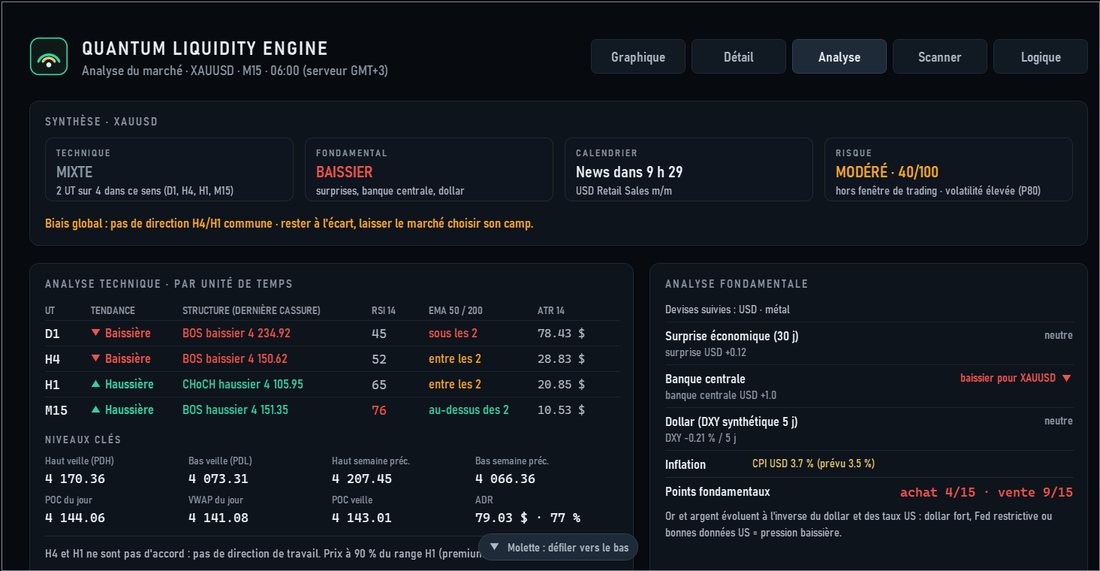
QLE Pro Analysis tab: trend by timeframe, key levels and fundamental analysis

A complete analysis at a glance

The Analysis tab sums up the trend by timeframe, key levels and the fundamental backdrop: economic surprises, central banks, the dollar.

  • Scanner: gold, silver, indices, oil and forex monitored at the same time.
  • Alerts by popup, sound or notification on your phone when a setup forms.
  • Works on every symbol your broker offers, on a Windows PC or VPS.

Watch the video

QLE Pro in 2 minutesVideo coming soon
The panel, the layers, the lot calculator and the analysis pages.

Choose your plan

One licence per MetaTrader 5 account, delivered as soon as payment is confirmed.

1 month

Mensuel

49 USD


  • All QLE Pro features
  • 1 MetaTrader 5 account, live or demo
  • Updates included
  • Extends an active licence

Contact us for this plan.

Ready in three steps

  1. Pay

    Choose a plan and enter the number of the MT5 account that will receive the licence.

  2. Get your key

    Your key appears as soon as payment is confirmed and is also sent to you by email.

  3. Install and paste the key

    Run the installer, drag QLE Pro onto a chart and paste your key.

Frequently asked questions

Does QLE Pro place orders for me?

No. QLE Pro is an indicator: it analyses and suggests, but has no order-placing function. You decide and you place your orders yourself.

How many accounts can I use it on?

One licence covers one MetaTrader 5 account number. You can use it on as many charts as you like with that account. Another account needs another licence.

Live or demo account?

Paid plans work on both live and demo accounts. The free trial works on demo accounts only.

What happens when my licence ends?

QLE Pro shows the activation screen. Buy a new period with the same account number: it is added to your current end date and you receive a new key.

Do I need an internet connection or a DLL?

No. The key is verified inside MetaTrader 5, offline and without any DLL. QLE Pro runs on your Windows PC or on a Windows VPS.

Which markets does it work on?

Every symbol your broker offers: gold, silver, indices, oil, forex, crypto. It is tuned first and foremost for gold and indices on M15, with direction read on H4 and H1.

Are profits guaranteed?

No. No tool guarantees profits. QLE Pro helps you read the market and manage your risk; trading involves a risk of capital loss.

How do I pay with USDT or USDC?

Choose USDT or USDC at checkout, then send the amount on the network of your choice (TRON, BNB Chain, Ethereum, Solana…). The key is delivered as soon as the payment is confirmed.

A question? Write to us

Installing QLE Pro, activation, choosing a plan or a partnership: leave us a message and we will answer by e-mail, usually within 24 hours.

Prefer to chat right away?

We only use this information to answer you.

Your next decision deserves a better read of the market

Install QLE Pro, paste your key, and see on the chart where to enter, when to wait and where to exit.